Recurring invoices, generated automatically

A long-awaited one: set up a recurring invoice that repeats at a set interval, and Sliptree generates the invoice every time, and sends it too if you want. It is a good way to put routine invoicing on autopilot and win back some time.
How do I make a recurring invoice?
Go to Invoices, then to the Recurring invoices tab, and click New Recurring Invoice. You can also turn an existing invoice into a recurring one: open the More actions menu on the invoice page and choose Make recurring.
Every recurring invoice has its own schedule
Under Details & schedule you set how often the invoice repeats, the Start date, and whether it Expires on a date, after a number of invoices, or never. For month-end billing there is a separate switch, Always generate on the last day of the month, so the invoice is generated on the last day of every month. That matters for February and March, for example.
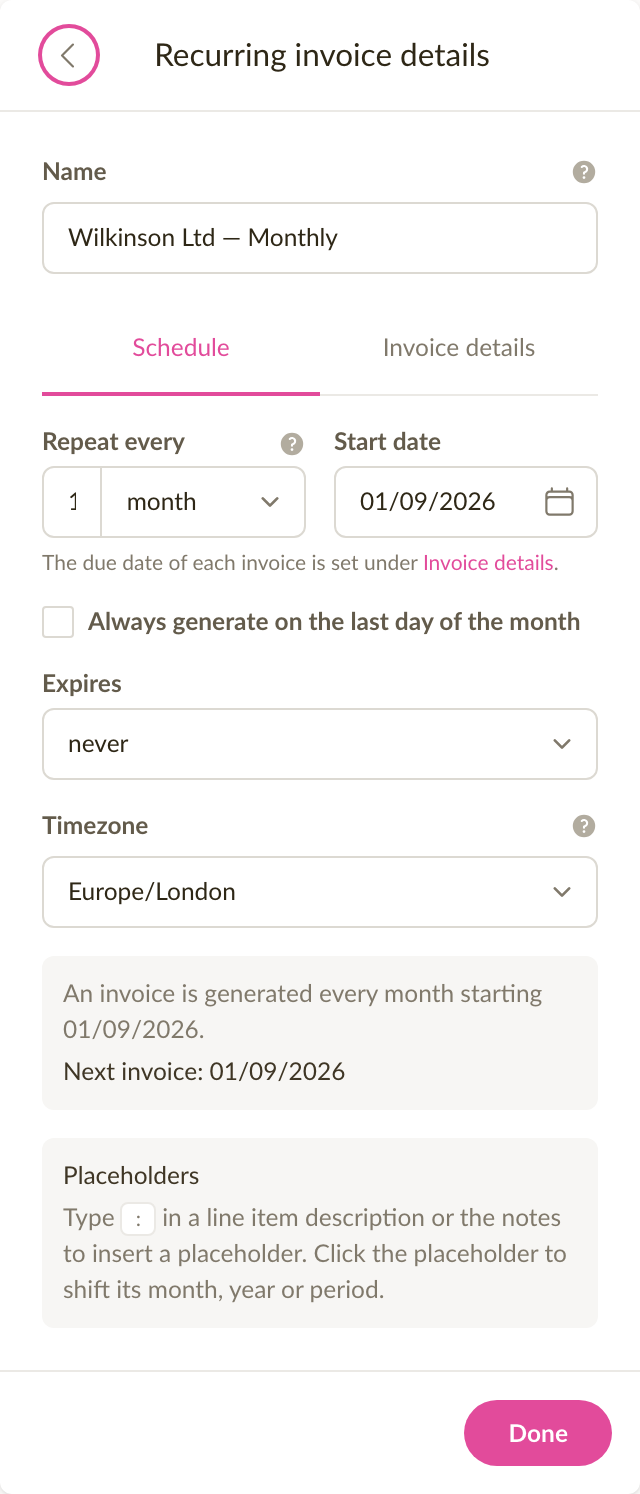
Each invoice is generated according to the schedule, in the recurring invoice's timezone, at around 8:00 in the morning. The recurring invoice's page always shows the date of the next one.
NB! A new recurring invoice starts out inactive and generates nothing until you click Activate.
A generated invoice can stay a draft or go straight to the customer
The Delivery tab has four choices under After an invoice is generated. With Save as draft the invoice waits for you to look it over and send it yourself, and with Save as completed it gets a number straight away. With Send via email it goes out with the email template and recipients you chose, and with Send as e-invoice it reaches the customer as an e-invoice, if the customer accepts them. Every generated invoice lands in your invoice list like any other, with a small mark next to its number that tells it apart. The list's Recurring invoice filter gathers the invoices of one recurring invoice together.
Placeholders put changing values on the invoice
The invoice probably has to name the period it covers. A rent invoice may need the month and the year, for example "August 2026". So that you do not type it on every invoice by hand, you can use placeholders.
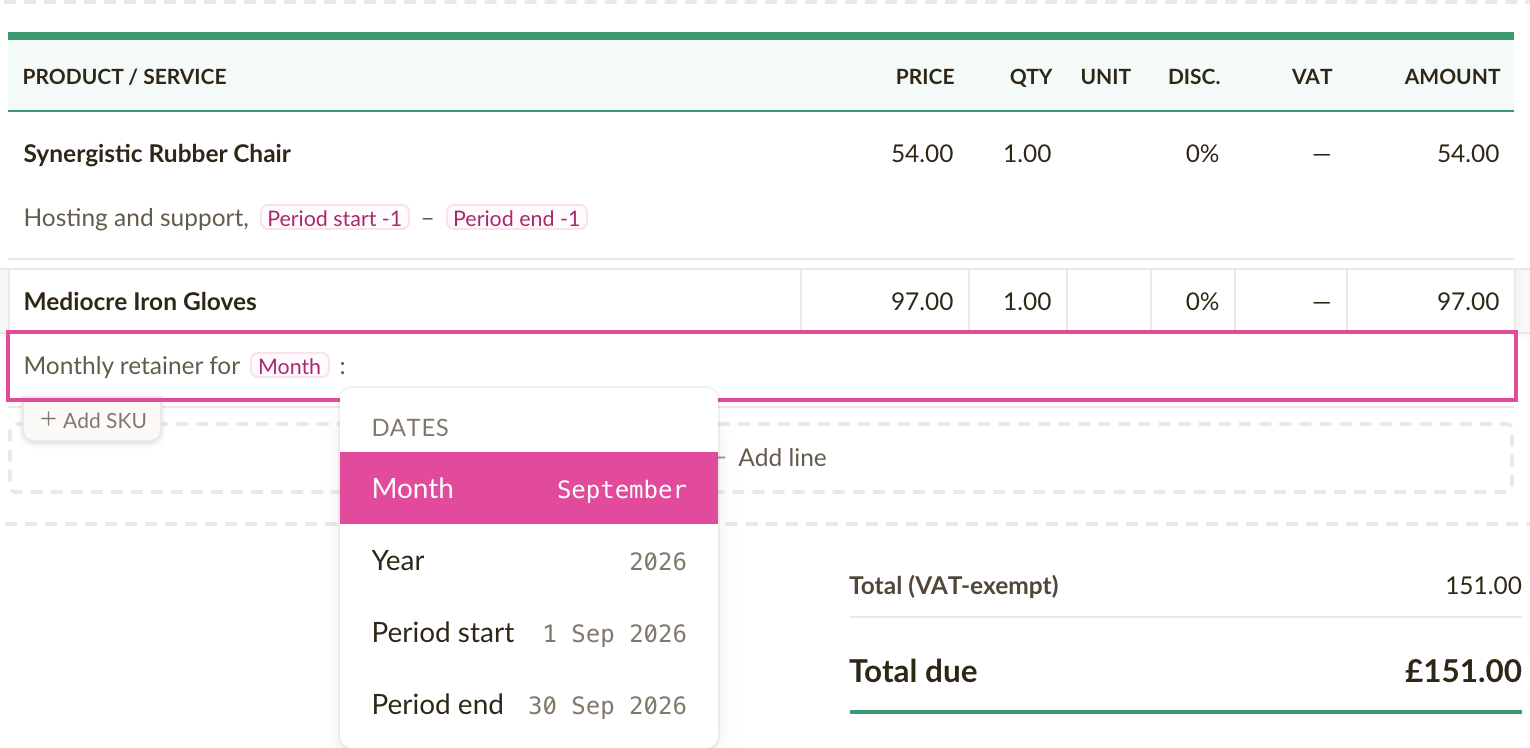
Type : (a colon) in a line item description or in the notes and pick Month, Year, Period start or Period end. The placeholder appears in the text as a clearly marked chip that shows the placeholder's name, and hovering it shows the value that will take its place on the next invoice.
Click a chip to move its period forward or back. You usually need that when you invoice in September for August. The Preview next invoice switch on the recurring invoice's page shows the document with every placeholder replaced by the value the next invoice will get.
A schedule can be paused, or an invoice generated right away
Generate now creates an invoice immediately and leaves the schedule alone. You may need it for a first test invoice or an extra one. Deactivate stops the schedule and Activate starts it again. Under every recurring invoice you can see each invoice generated so far and the whole history of that recurring invoice.

Note: the Free plan allows one active recurring invoice at a time; the Starter and Unlimited plans have no limit.
Fixes and improvements
- Searching the invoice list by customer or by line item is now noticeably faster, also for companies with thousands of invoices.
- When you pick a customer on an invoice, the business register lookup answers faster and offers matches from the third character.
- The totals of an invoice or estimate are now calculated faster, also on a phone and on documents with hundreds of line items.
- When a line item on an e-invoice had no name, a rather cryptic technical error used to appear. Now the message says clearly which line needs fixing.
The document on screen matches the printed page
The invoice or estimate on screen is now drawn in the printed page's proportions. Text wraps on the same words and every page starts with the same line, so what you arrange is what your customer receives.
The same page while editing, on the document page, and in the shared link
Before, the page was the right width but its text was larger, so a long description could run onto more lines on screen than in the file. The page is now a little wider and its text a little smaller. More of a long document fits on screen as a result.
Fixes and improvements
- The page break marker inside a long description now sits at the exact word the next page begins with, instead of a few words before or after it. See Page breaks in invoices and estimates.
- Invoices and estimates have more room on wide screens, so the document and the panel beside it both keep their full width.
Room for licence and certificate numbers on your invoices
You can now put a licence number, an activity certificate or a personal identification code in a new Additional information field. Whatever you type there prints under your business details, worded exactly as you entered it.
Numbers that are not a company registration number
Not every business has a company code. Someone trading as an individual in Lithuania invoices under an activity certificate number and activity codes, and an Icelandic sole trader under a personal identity code. Plenty of businesses also carry a licence number their invoices have to show. Until now the only place for those was Registration number, which takes one company code and nothing else.
Open Business settings and you will find the new field on the Company profile tab, under VAT & Registration. Your customers have the same field, so a number a customer asks you to include prints under their details instead. See Adding a licence, certificate or personal code to your invoices for the details.
Registration numbers print under the name your country uses
A Finnish business now shows Y-tunnus on its invoices in place of the generic term, a Czech one IČO and a Danish one CVR-nr. The name comes from the register that issued the number, so an invoice calls it what its reader would search for.
Where a register publishes that name in more than one language, the reader's own is used: Finland's is officially Business ID in English and FO-nummer in Swedish. Where a register has no name in the reader's language, its own stands, so a Finnish business invoicing in Estonian still shows Y-tunnus.
Your customers' numbers follow the same rule, so one invoice can carry two different names, each correct for the business it sits under.
Fixes and improvements
- The Registration number field now says what to do when it turns a number away. Type a number with a label in front and it offers the number back on its own. Where the number is not a company code at all, it points you to Additional information.
- Estonian businesses and customers without a registry code can enter a personal identification code in Registration number.
- On documents the label is abbreviated the way invoices write it, so a long line of business details stays easier to read.
- In rare cases some of the text on a PDF was left untranslated. That is fixed, and PDFs should now always be fully translated.
Format text on invoices
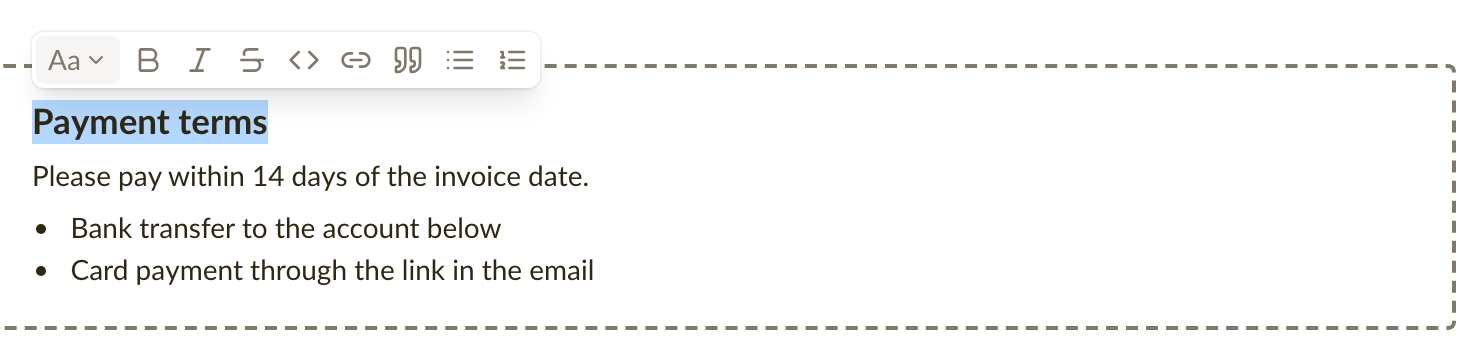
You can now format the text on invoices and estimates: bold, lists, headings and links in the notes and in line item and product descriptions, so payment terms and product details read the way you meant them. Comments and emails get the same editor, so formatting is easier there too: select some text and a small toolbar does the rest, with no Markdown to remember. What you see while writing is what the customer gets on the page, in the PDF and in the email.
Format text where you write it
Select some text in a note, a description or a comment and a small toolbar appears with bold, italic, strikethrough, links, quotes and bulleted or numbered lists. Each option also has a keyboard shortcut, and the toolbar shows it when you hover over a button. Notes and emails can carry headings and a horizontal rule as well, so longer terms and conditions get a structure the customer can scan.
Notes and descriptions written earlier look exactly as before, and if you prefer typing Markdown, it still works. See Formatting text for the full list.
Placeholders in emails are picked from a list
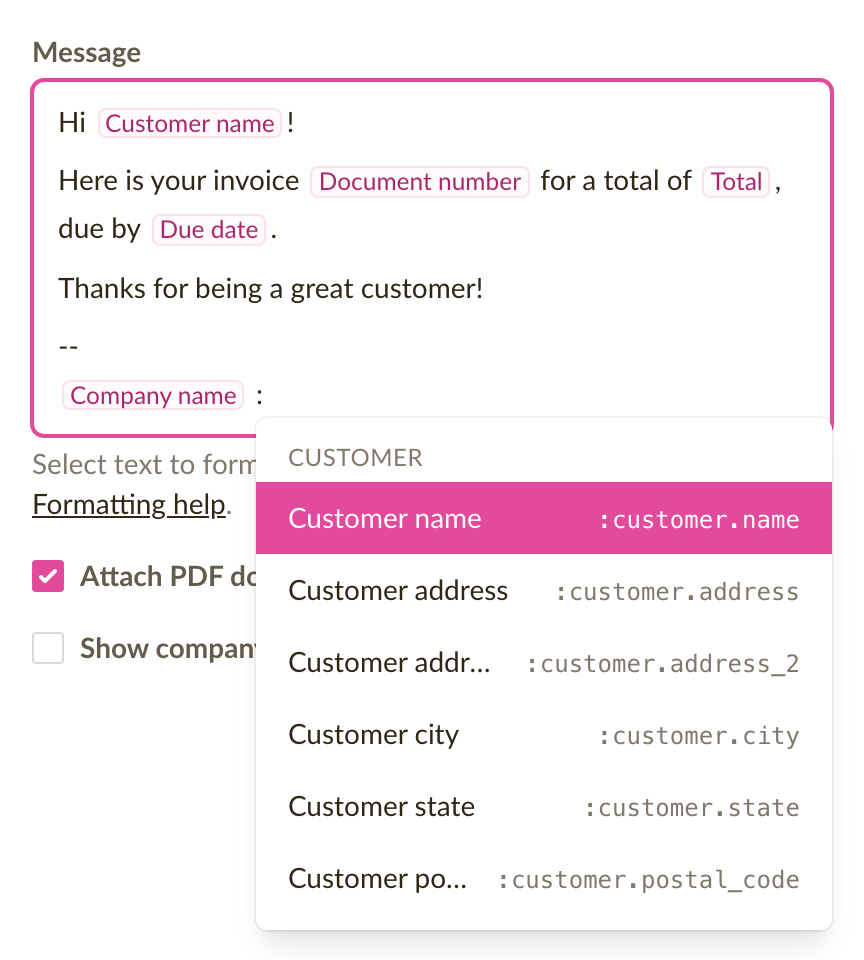
In an email template, or in the message when you click Send invoice, type : and pick a placeholder from the list that opens: the customer's name, the invoice number, the amount due, the due date and so on. The placeholder sits in the text as a labelled chip, so you read Customer name while writing instead of :customer.name. The real value is filled in when the email is sent. Existing templates keep working unchanged. See Using placeholders in emails.
Fixes and improvements
- Editing an invoice with hundreds of line items is noticeably faster: clicking into a description or typing no longer makes the editor pause.
- The page break line in the editor now shows on phones as well, between the line items in the mobile layout. It also runs through a long description or the notes, at the line where the printed page ends, and follows the text as you type.
- The Next document number can no longer end up on a number that is already taken, which could make confirming an invoice fail. If you choose a number that is in use, the field says so as you type.
- Pressing Back in the browser after saving an invoice or estimate no longer reopens the form you just saved, so the same document cannot be saved twice by accident.
Page breaks in the editor, cleaner line items, and faster PDFs
You can now see where each printed page ends while editing an invoice or estimate, so you know the page count before you download the PDF. Line items also take less room in the editor, and PDFs download noticeably faster.
Page breaks are shown in the editor
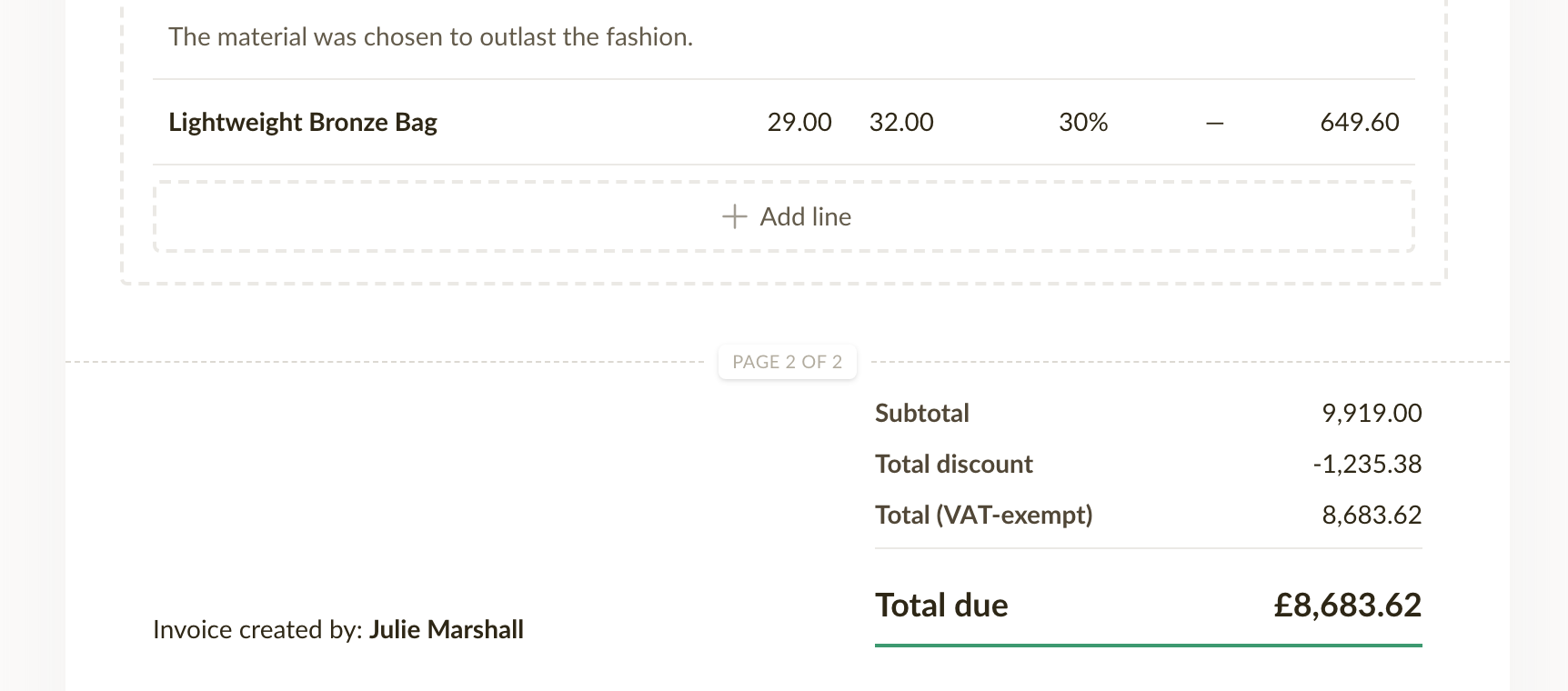
A dashed line with a page number marks where each printed page ends, and it moves as you add line items or write longer descriptions. The line is only a guide and changes nothing in the document itself.
Empty description and SKU fields are hidden in the editor
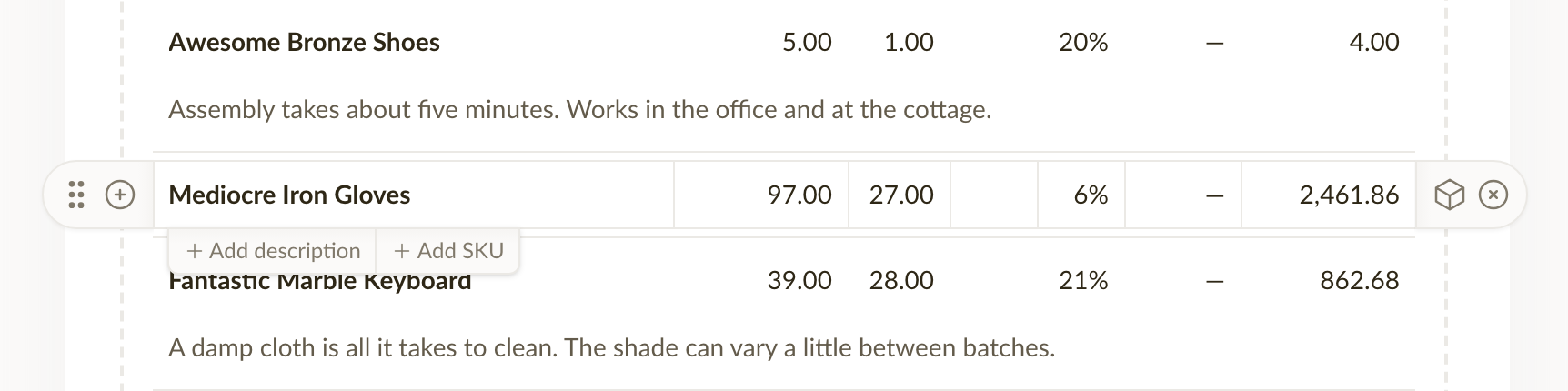
When you edit an invoice or estimate, a line item now shows its description and SKU fields only when there is something in them, so a document with plain line items takes far less room on screen. Before, both fields were drawn on every line whether you used them or not. Hover a line item and + Add description and + Add SKU appear underneath it. A field with text in it always stays visible, and clearing one folds it away again once you move to another line.
Fixes and improvements
- Downloading a PDF and exporting documents are noticeably faster, also on documents with hundreds of line items.
- A line item description that is too long to fit on one page now continues on the next page instead of being cut off in the PDF.
Exports are now more reliable
We have rebuilt how exports work behind the scenes. Whether you are exporting a handful of invoices or your entire archive as PDFs, exports now run in the background on our servers — and they finish, every time.
Start an export and walk away
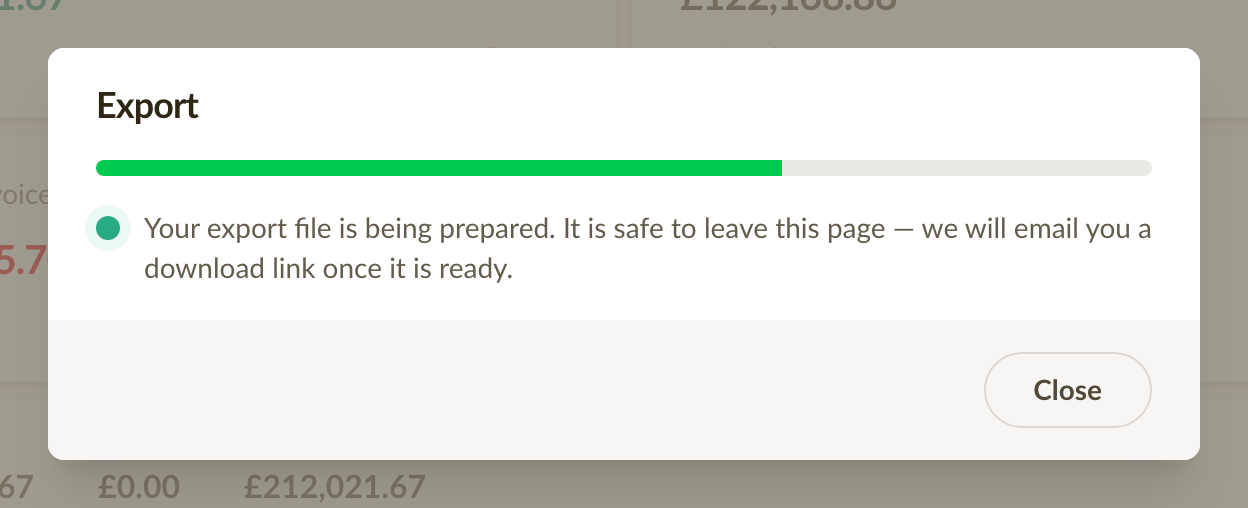
Once you start an export, there is no need to keep the page open. You can keep working elsewhere in Sliptree, or close the tab entirely — the export keeps running. A progress bar shows how far along it is if you stay.
A download link in your inbox
When the export file is ready, it downloads automatically if you still have the page open. Either way, we also email you a download link, so nothing is lost if you have moved on. The link stays valid for 7 days.
Large exports finish
Previously, exporting many documents at once could time out and leave you with nothing. Now each document is processed separately, so exports of hundreds of PDFs complete reliably. And if a single document cannot be included for some reason, the rest of the export still finishes — with a note telling you exactly what is missing.
Registration numbers are now checked for typos
When you enter a registration number for your business or for a customer, Sliptree now checks it against the official format of the company's country. A mistyped number is caught right in the form, before it ends up printed on an invoice.
Checked against the country's official format
Registration numbers in 23 countries are now format-checked — Estonian registry codes are 8 digits, Finnish business IDs look like 1234567-8, Swedish organisation numbers like 556677-8899, and so on. Where a country builds a check digit into its numbers, we verify that too, so even a number with the right length but two digits swapped gets flagged. When a number doesn't pass, the form tells you what a number from that country should look like.
Type numbers the way they're written
There's no need to strip spaces, dots or other separators before pasting a number. A Norwegian VAT number written as NO 974 760 673 MVA, or a Swiss one as CHE-109.322.551 MWST, is understood as-is. VAT number checking also became more accurate: certain valid French, Swiss, Norwegian and UK VAT numbers that were previously rejected are now accepted.
Existing numbers are left alone
The check runs when a number is entered or changed. Numbers that are already saved stay as they are — editing other details of your business or a customer, or re-importing an unchanged customer list, works exactly as before.
Send e-invoices to Lithuanian companies
Lithuania joins Estonia and Latvia as a supported e-invoicing country. If your company is registered in Lithuania, you can now set up e-invoicing and send e-invoices the same way Estonian and Latvian companies already do.
Verified automatically, against the business registry
Before you can send e-invoices on behalf of a company, we need to confirm you're legally authorized to represent it. For Lithuanian companies, we now check this automatically against Registrų centras, Lithuania's business registry — the same way we already check against Estonia's and Latvia's registries.
A fallback when the check can't confirm you
If the automatic check can't match you to the company — for example, if your role in the registry doesn't map cleanly to one we recognize — you can confirm your authority yourself with a short self-attestation, exactly as with any other country.
Start email templates from Sliptree's built-in translations
It's now easy to add email templates for a new language. Sliptree ships with built-in templates in many languages, and you can pull them into your account instead of writing each one from scratch.
A starting point, when you want one
When creating a template, once you've picked a type and language and the subject and message are still empty, a prompt appears: "Sliptree has a built-in template for this — Use it." Accepting fills in the subject, message, and name (if empty) from Sliptree's built-in content, which you can then edit freely.
Add a language in one click
The Emails settings screen now has an Add language action that bulk-creates the built-in templates — Invoice, Invoice reminder, Estimate, and Estimate follow-up — for any language your company doesn't have a complete set for yet. The picker only lists languages that are still missing templates, so you won't end up with duplicates.
We also audited and fixed a number of existing translations across the app as part of ongoing localization work.
Email templates are now organized by type
Email templates used to be a flat list loosely tied to invoices or estimates. Now every template has a type, which Sliptree uses to pick the right one for you when sending a document.
The four types of emails
There are four types: Invoice, Invoice reminder, Estimate, and Estimate follow-up. The type decides which document it belongs to and when it should be used, so an invoice payment reminder can't go out when you meant to send a new estimate.
The right template, picked for you
When sending a document (such as an invoice or estimate), Sliptree picks the most appropriate email template for you: a reminder once an invoice is overdue, a follow-up for an estimate you've sent, in the document's language. If there are multiple templates with the same type and language, you can choose one as the default. You can pick a different template before sending, and still customize the final subject and message before the email goes out.
The Emails settings screen now groups templates by type and shows each one's language, so the whole set stays easy to scan even when you write to customers in several languages.
Assign customers to salespeople, scope what sales reps can see
Building on the Sales Representative role we introduced in 2024, customers can now be assigned to a specific team member, and what a sales rep can see across the app reflects that assignment.
Assign a salesperson to each customer
When you create or edit a customer, you can pick the team member responsible for them. Customers without a salesperson are visible to everyone — a useful shared pool for trade-show contacts, walk-ins, or anything that hasn't been claimed yet.
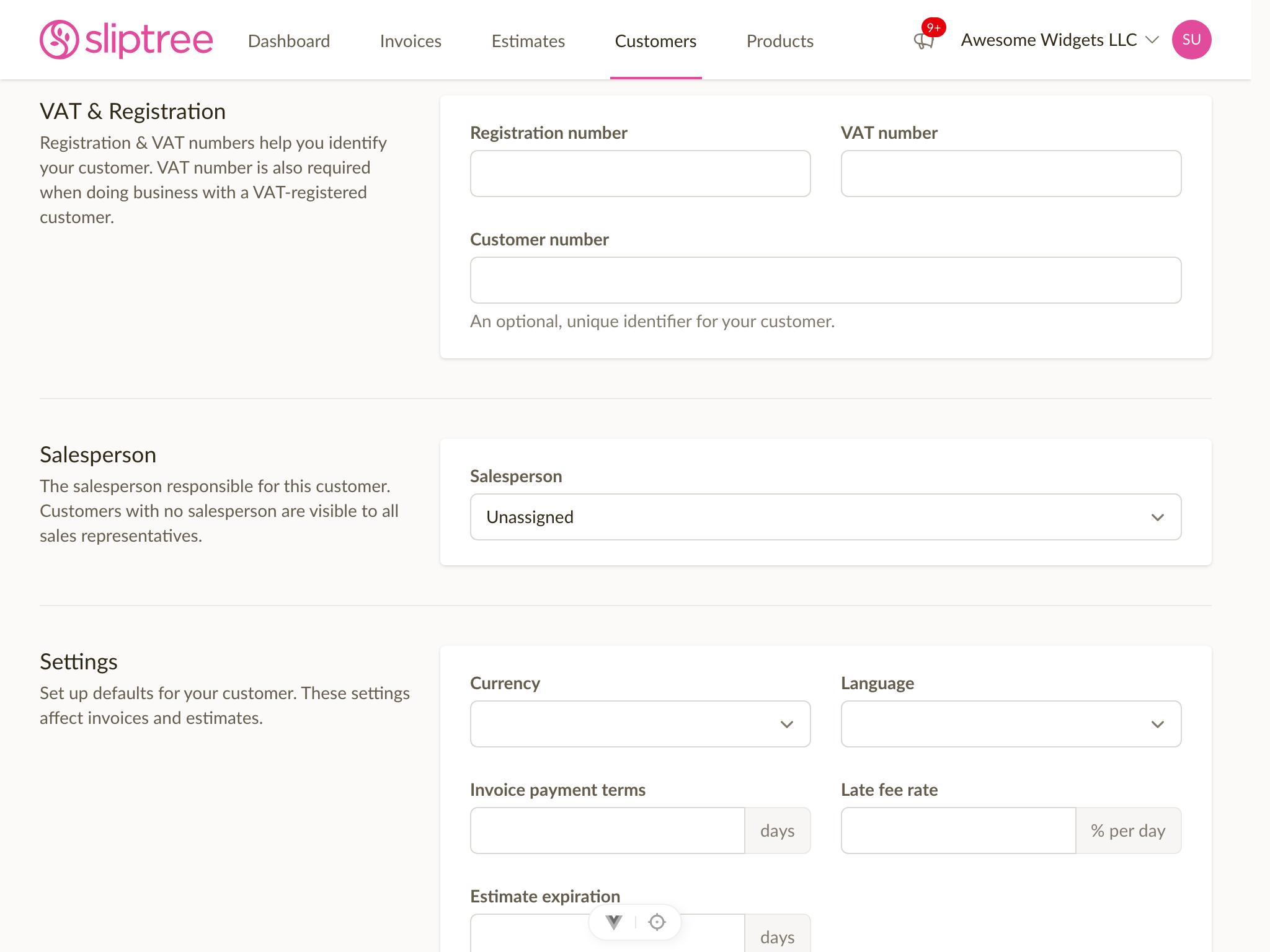
Sales reps only see what's theirs
A sales rep now sees only the customers they're assigned to, plus the shared pool. Other reps' customers are completely hidden from them — they don't show up in the list, in search, or via direct URL. Admins continue to see everything.
This matches how invoices and estimates already worked for sales reps, and means the role is now a coherent end-to-end scoping mechanism rather than just an invoice-level restriction.
Filter customers, invoices, and estimates by who they belong to
Admins get a new Salesperson filter on the customer list and a Created by filter on invoices and estimates. Sort by them, filter to a single team member, or use the Unassigned option to find customers still in the shared pool.
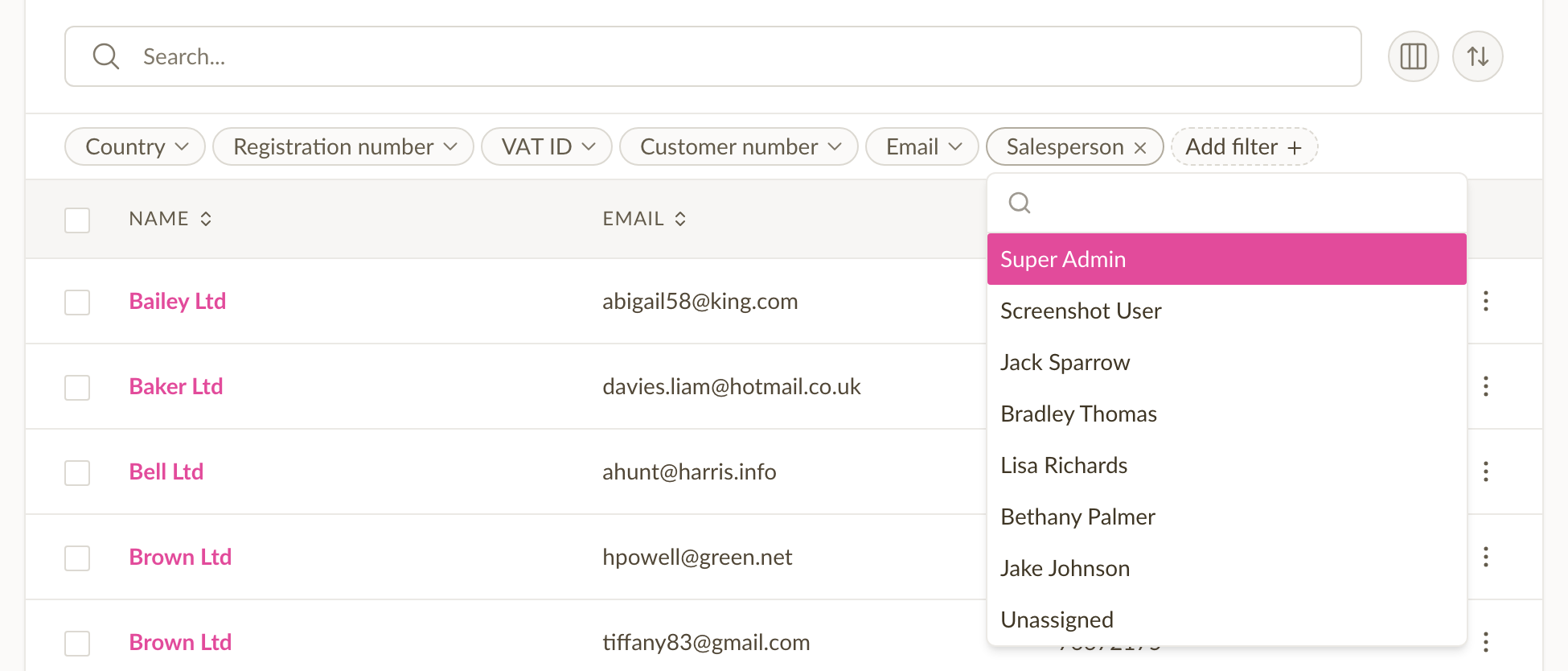
Both lists also gained a default-hidden Salesperson / Created by column you can toggle on if you want it visible at a glance.
Reassign customers in bulk
When a team member leaves or you reshuffle territories, you can now select multiple customers and reassign them to another team member — or back to the shared pool — in one go. No more editing customers one at a time.
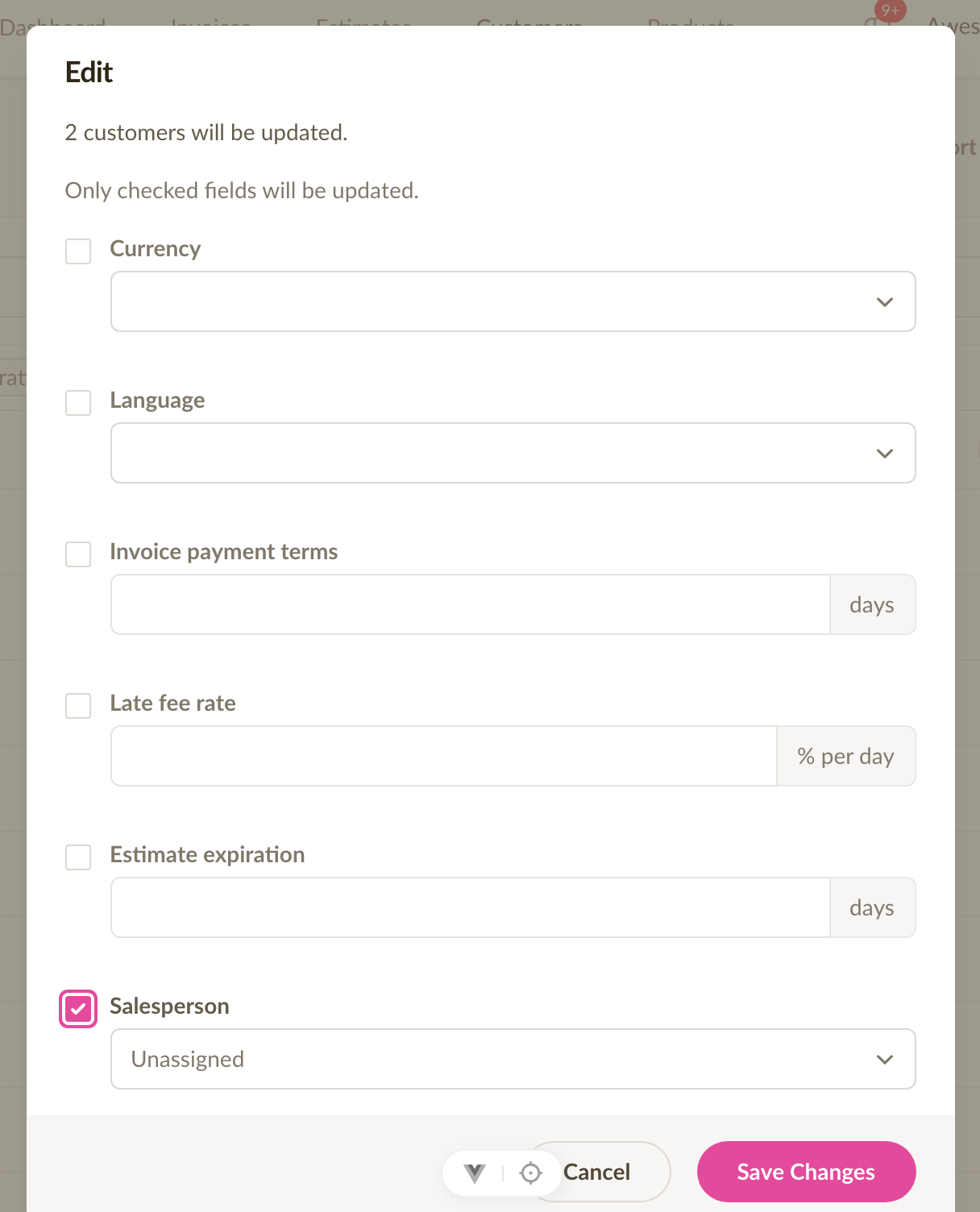
Other small touches
The customer details card now shows the assigned salesperson, the form preselects the current user for sales reps creating a customer, and the role-change confirmation dialog now describes the sales rep scope accurately for both invoices and customers.
Cross-border e-invoicing, Latvia & Lithuania support, and a simpler setup
Sliptree now sends e-invoices over the Peppol network, so you can send them to customers in other European countries. E-invoicing is also available to companies in Latvia and Lithuania, and the setup has been rebuilt as a guided flow.
Send e-invoices across borders via Peppol
Until now, e-invoicing in Sliptree was Estonia-only: both ends of the invoice had to be on the Estonian network. Sliptree now sends Peppol BIS 3.0 compliant UBL invoices, which means an Estonian company can send an e-invoice to a customer in Latvia, Lithuania, Finland, or any other country on the Peppol network. The UI shows which network each invoice was delivered through (Estonian or Peppol), so you always know how it went out.
E-invoicing for Latvia and Lithuania
Latvian and Lithuanian companies can now send e-invoices directly from Sliptree, the same way Estonian companies already do. This includes country-specific prerequisites — for example, Latvia requires a VAT ID — and a representation rights check against the Latvian VISS registry, so we know the person setting it up actually has authority to do so on behalf of the company.
A streamlined e-invoicing setup
We've significantly streamlined the e-invoicing setup. It's now a step-by-step guided flow that walks you through identity verification, representation rights, prerequisites, and activation — only showing what's relevant for your company's country. If something's missing, you'll see exactly what and why. If automated checks aren't available in your country, you can self-attest to your representation rights and continue.
Better visibility into delivery
When delivery status data is available, e-invoice delivery and bounce events now show up in the invoice activity log — so you can see at a glance whether an e-invoice actually reached the recipient.
Company data search expanded to seven countries
We've expanded our company data search to four new countries: Belgium, Lithuania, Sweden and Norway — joining Estonia, Latvia and Finland which were already supported.
When you start typing a customer name, Sliptree provides real-time suggestions from all seven countries, filling in the registration number, address, and — where the registry provides it — the VAT number. All data is synced daily from official government sources and stored locally, so searches are instant and reliable.
Email template improvements and a handful of fixes
A small batch of updates to how Sliptree sends invoice and estimate emails, plus a few fixes worth calling out.
Hide the company logo in sent emails
Some of you told us the large logo at the top of every invoice email felt out of place. Each email template now has a Show company logo at the top of the
email setting, so you can decide per template whether the header shows your logo (or company name fallback) or stays clean. Existing templates keep the logo
on by default — new templates start with it off.
Line breaks in email messages are now preserved
Until now, single line breaks you added to an email template were silently collapsed when the email was rendered, leaving paragraphs run together. Newlines are
now preserved as proper line breaks, while blank lines still create paragraph spacing — so the email arrives looking the way you wrote it.
Late fees stay disabled when you've turned them off
A late fee rate was sometimes added to an invoice when selecting a customer - even if late fee rates were disabled altogether in company settings. We've fixed
this, so late fee is never added to the invoice if disabled in settings.
Two-factor authentication setup shows the QR code reliably
A bug in the 2FA enable flow could leave the QR code hidden after enabling. The QR code now appears every time, so you can finish setting up your authenticator
app in one step.
Introducing the Starter plan
We're introducing a new Starter plan to make Sliptree more accessible to freelancers and small businesses who need more than the free tier but don't need unlimited everything.
New pricing tiers
We now offer three plans:
- Free - 10 invoices per year, 5 customers, 1 team member
- Starter - 30 invoices per year, 25 customers, 1 team member — 9 EUR/month or 90 EUR/year
- Unlimited - Unlimited invoices, customers, and team members — 17 EUR/month or 170 EUR/year
All plans include e-invoicing support and come with a 14-day free trial.
What's changing for free accounts
Free accounts now have a 5-customer limit in addition to the existing 10-invoice-per-year limit. If you already have more than 5 customers, you'll keep full access to all your existing data, but won't be able to add new customers until you upgrade or archive some.
Annual billing saves you 2 months
Both the Starter and Unlimited plans offer annual billing at a 2-month discount: 90 EUR/year for Starter and 170 EUR/year for Unlimited.
Refer a friend
Know someone who could use Sliptree? Share your referral link from the billing page. When they subscribe, you both get a free month on your plan.
Powerful filters, bulk actions, and performance improvements
The list views for invoices, estimates, customers and products have been redesigned, so you can find what you need faster and work with many records at once.
Redesigned filters
Until now, all filters sat inside a single dropdown, where they were easy to miss. Your most-used filters are now at the top of the list, and adding another takes one click. The new layout works on mobile too.
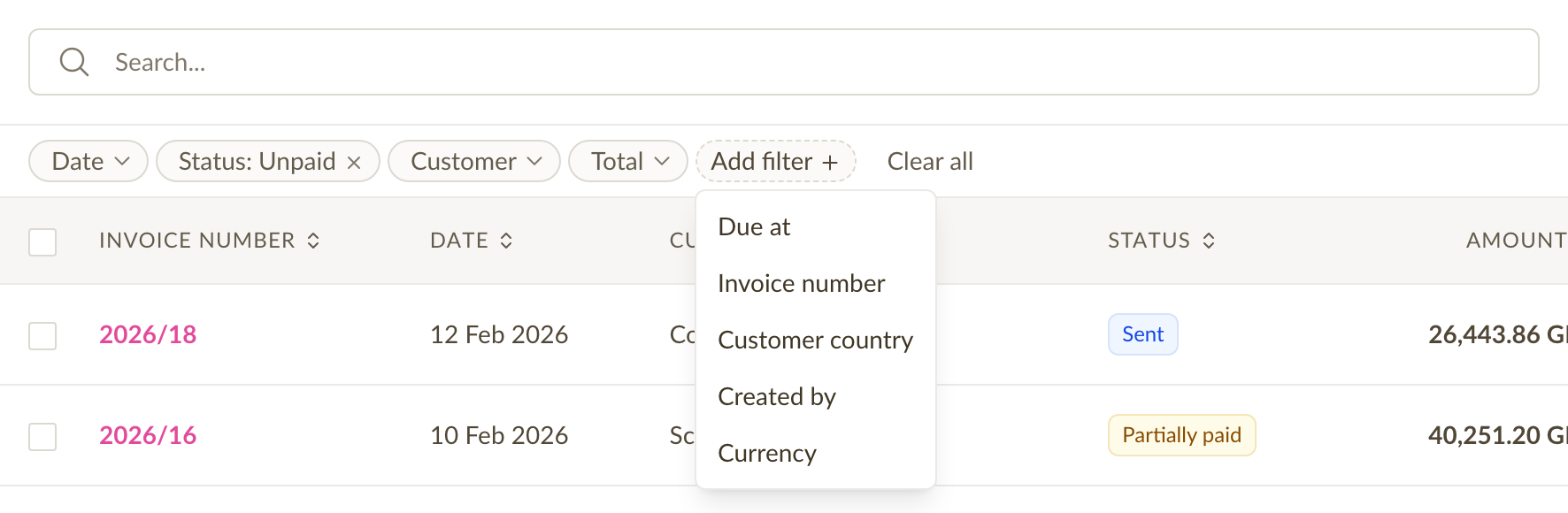
We've also added many new filter options. Filter invoices and estimates by date range, status, amount, or document number. Filter customers by country, currency, payment terms, and more. Filter products by price, tax rate, or unit. You can combine as many filters as you need.
Select and act on multiple records
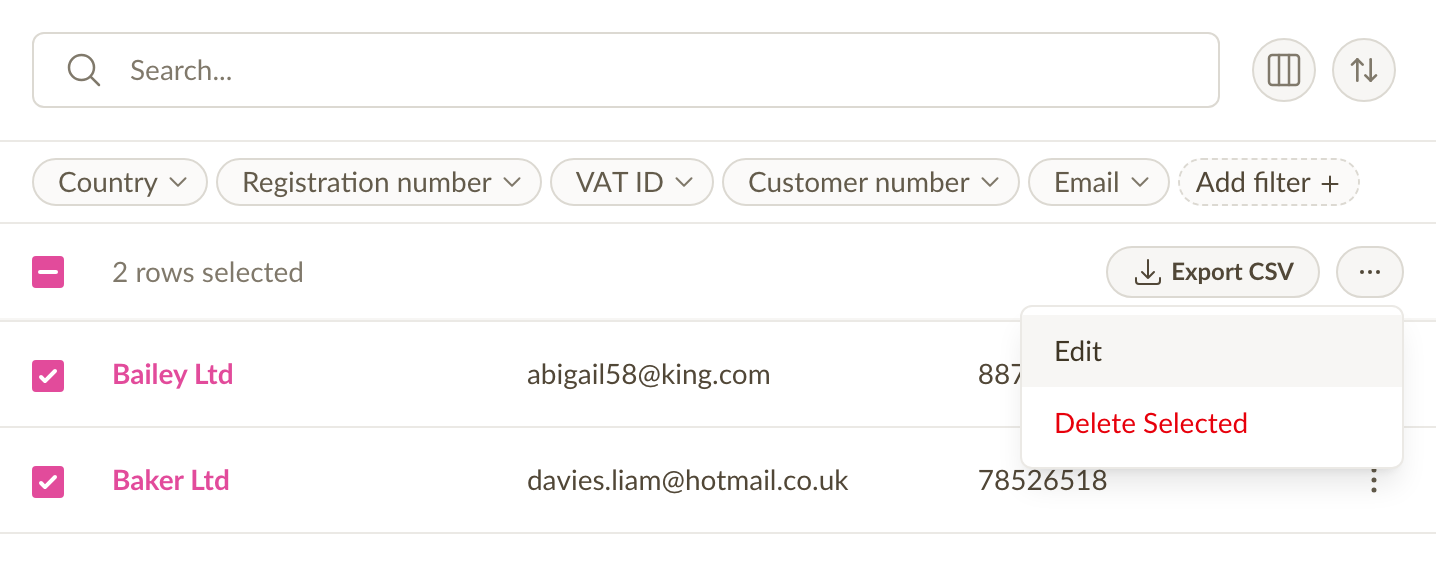
You can now select records using checkboxes and perform actions on them in bulk. Change the status of multiple invoices at once, export a selection to CSV or PDF, update shared fields across many products or customers, or delete records you no longer need. If you need to act on more than one page of results, there's a "select all matching filters" option that covers everything.
Customizable columns
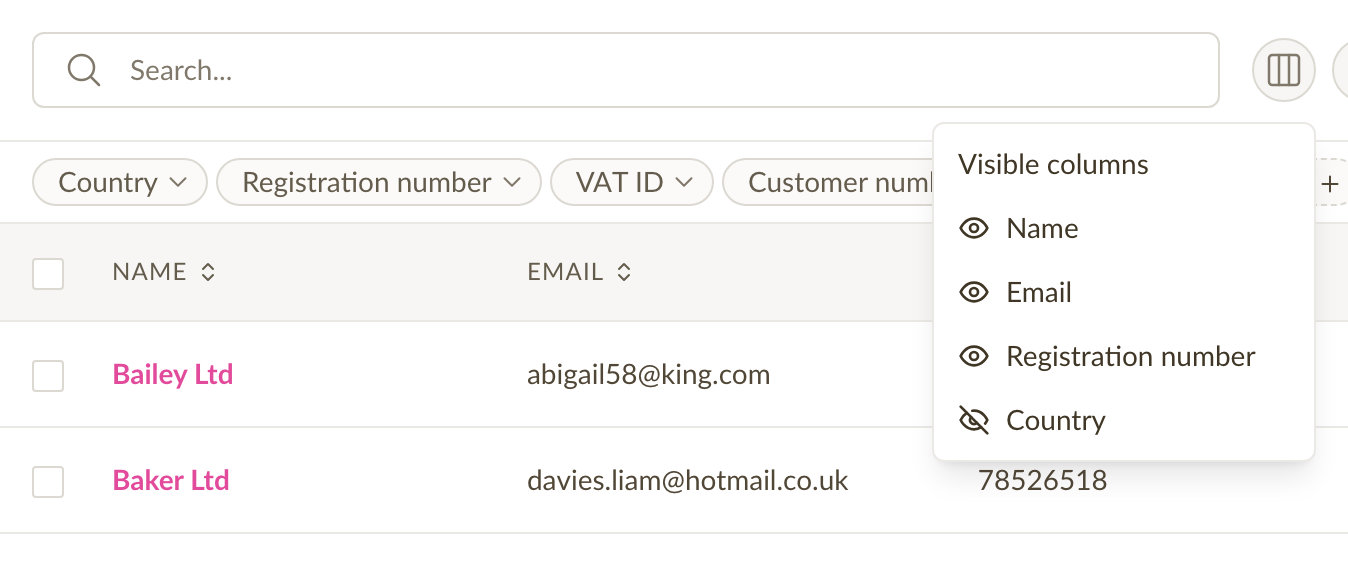
Choose which columns are visible on your list views. Prefer to see due dates instead of issue dates? Want to hide the country column? Your column preferences are saved, so the view is always set up the way you like it.
Faster invoice and estimate pages
Invoice and estimate detail pages now load noticeably faster. The activity feed (comments, status changes, emails sent) loads progressively in the background instead of blocking the page, so you see the document right away.
Fixes and improvements
- We fixed a bug that could produce an incorrect UBL/Peppol e-invoice XML file.
- Various visual and performance refinements across the app, along with improved keyboard navigation and accessibility.
Support for Finnish Reference Numbers
Sliptree now supports Finnish reference numbers on invoices. Reference numbers are a normal part of invoicing in Finland: banks use them to match a payment to the right invoice, so payments are processed accurately. Sliptree can now add one to your invoices automatically, based on either the invoice number or the customer number.

To get started, click on the invoice details (number, date) when creating an invoice, then click on Reference number, and choose whether to use invoice-based or customer-based reference numbers.
Save the settings and carry on with the invoice. The reference number is added when you save the invoice.
More details can be found in our help docs.
Enhanced Company Data Search Across Multiple Countries
Company search now covers Finland and Latvia as well as Estonia, and it is faster and more reliable than before.

Until now, company search asked the Estonian Business Registry directly, so it covered Estonian companies only, and when the registry's service was slow or down, the search was too. Sliptree now keeps its own copy of the company data and refreshes it every day from the official registers, so results come back at once and do not depend on the registry being reachable.
Start typing a customer's name when you create an invoice or a customer, and Sliptree suggests matching companies from all three countries. More countries will be added over time.
Improved sorting & invoice duplication
Today, we made two updates that improve both invoices and estimates:
Sorting invoices by number now makes more sense
When sorting invoices (or estimates) by number, the results didn’t always match what people expect. This happened because computers and humans sort mixed text (letters and numbers) differently. For example, with numbers like A20249 and A202410, we humans think A20249 should come first. But computers used to put them in the opposite order.
We’ve changed how the sorting works to match what people naturally expect. It’s not perfect every time, but it’s much closer!
Duplicated invoices use the latest customer and company info
Sliptree keeps a full record of company and customer details on every invoice. This way, if those details change later, old invoices still show what they looked like back when they were created.
Now, when you make a new invoice by duplicating an old one, we use the most up-to-date customer and company info instead of the old details. This means you won’t accidentally use outdated information if something has changed since the original invoice.
Export invoices to Peppol e-invoice format
It's now possible to export invoices created in Sliptree to Peppol BIS Billing v3.0 XML format, which is widely used in Europe for e-invoicing. This allows our users to send invoices to their customers via Peppol Access Points.
How to export invoices to Peppol BIS Billing v3.0 XML format
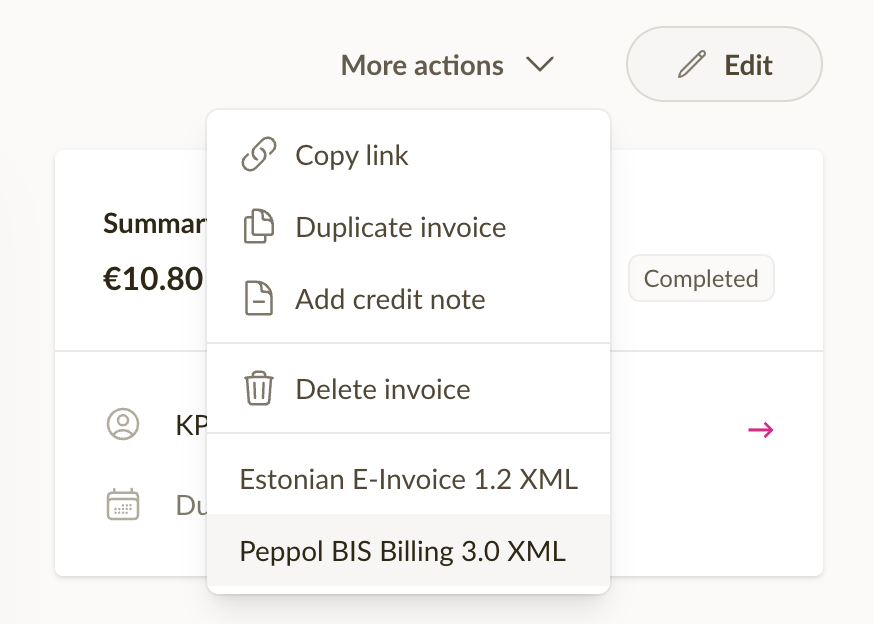
To export an invoice, simply open an invoice, click on More Actions and select Peppol BIS Billing v3.0 XML.
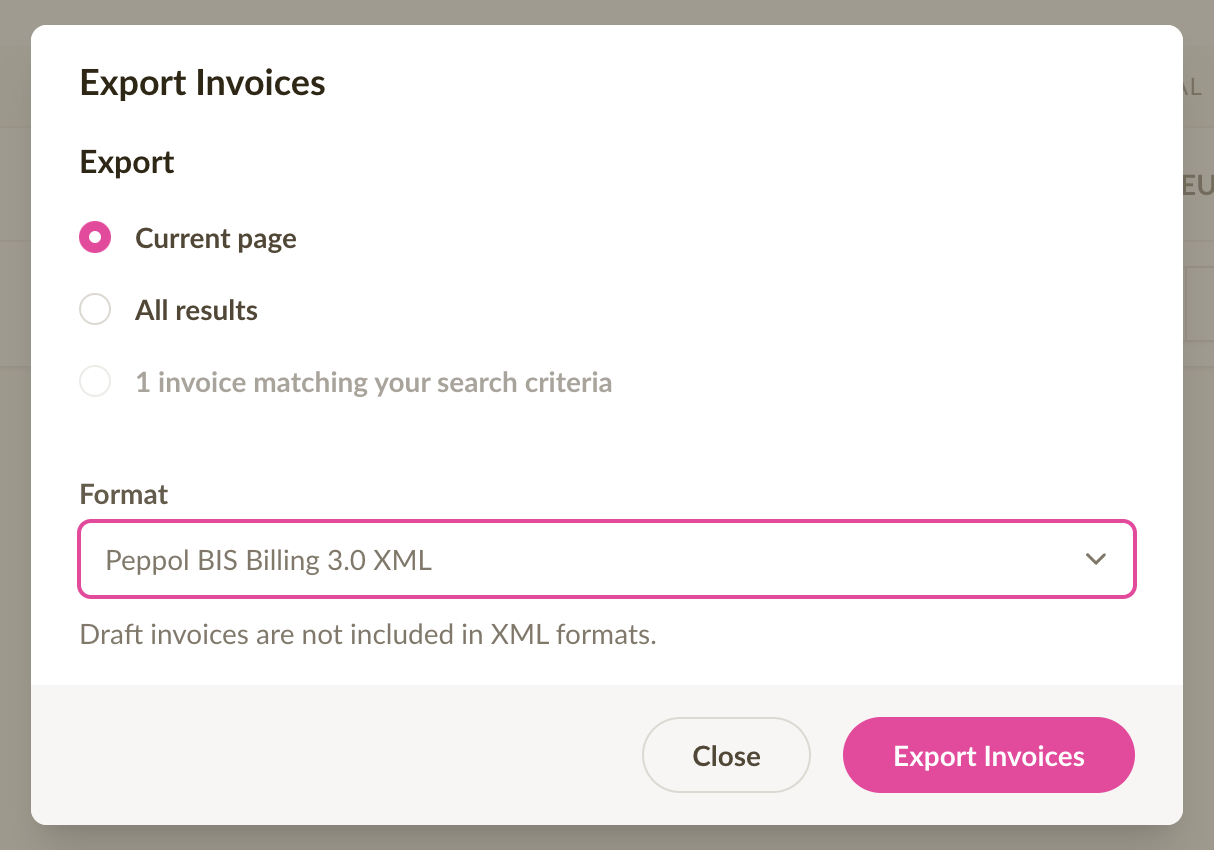
To export multiple invoices, go to the invoice list, select the date period that you want to export, click on Export and select Peppol BIS Billing v3.0 XML.
What can be done with the exported file?
The exported file can be either emailed to your customer, or sent to your customer via a Peppol Access Point.
Some countries, like Latvia, provide a government portal for uploading and sending these files to your customers.
Reorder line items and mobile improvements
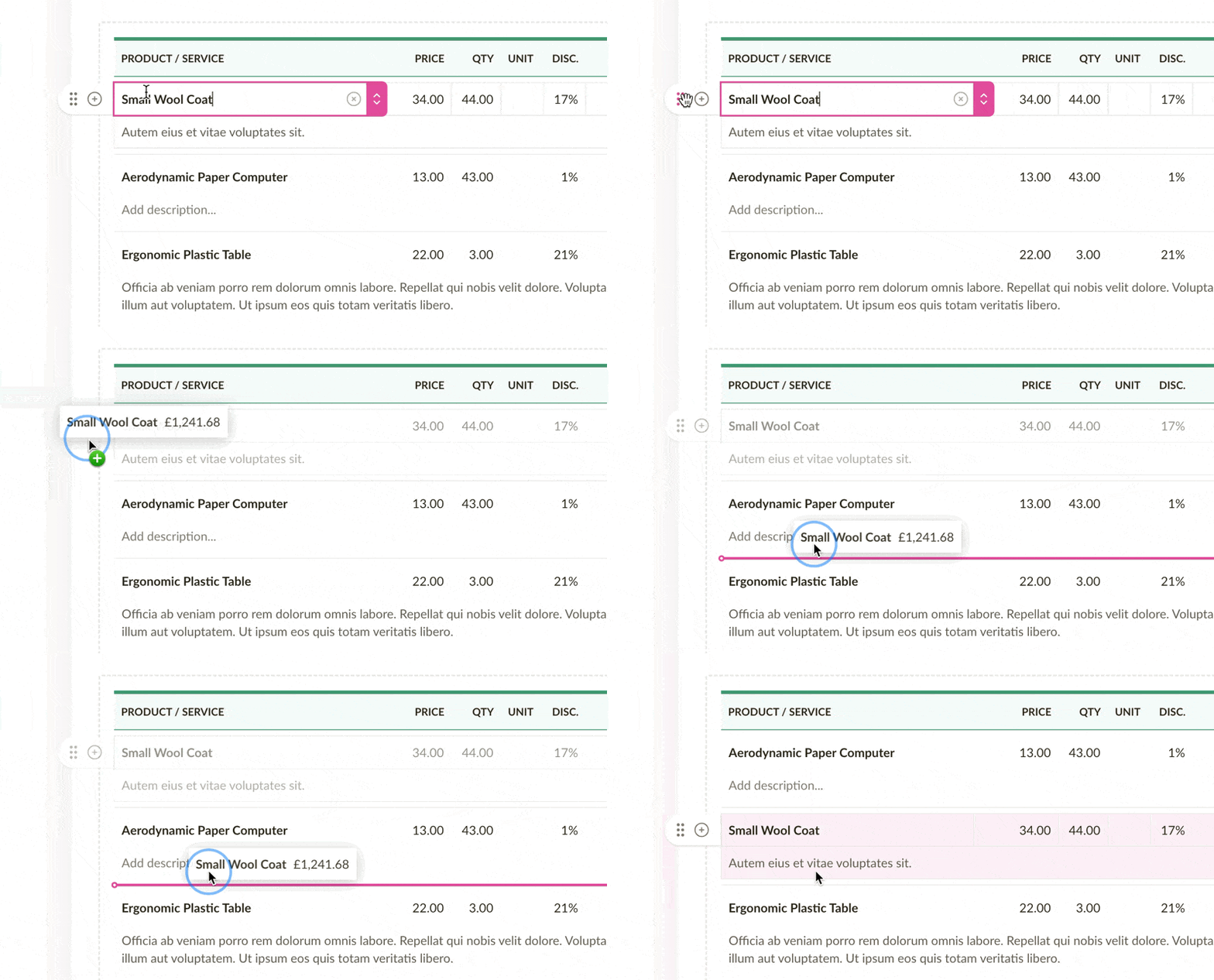
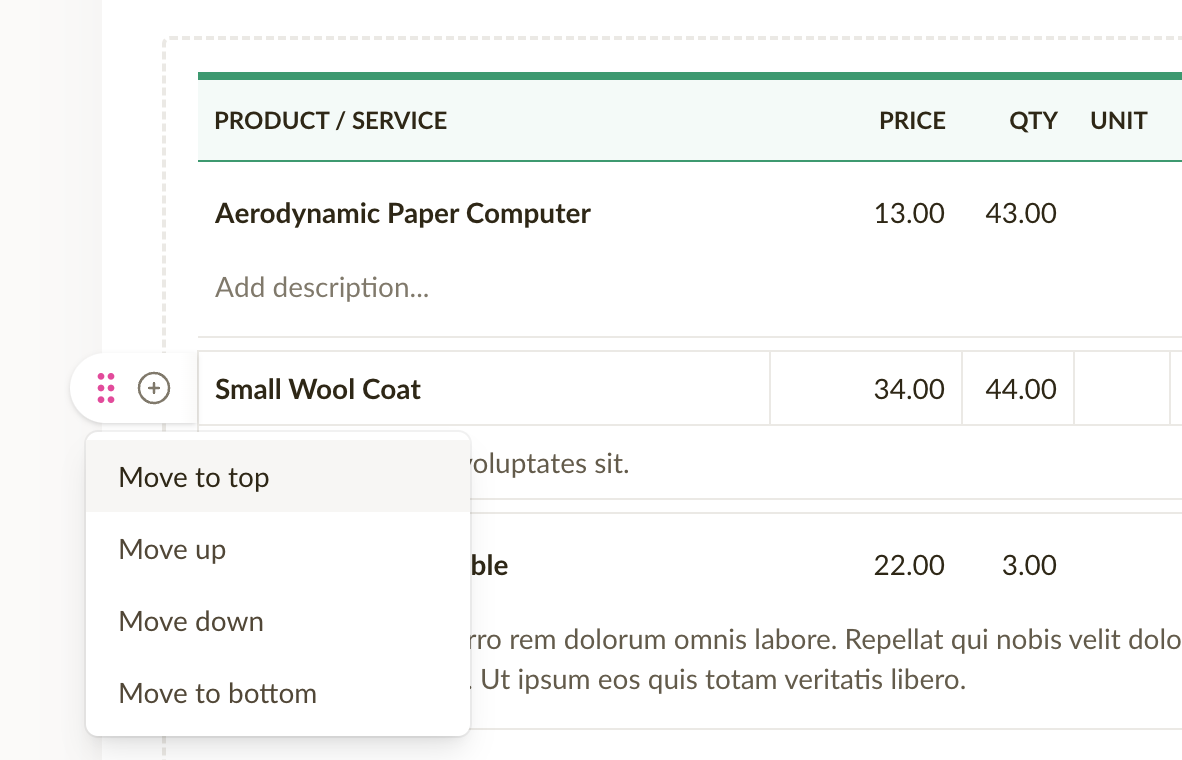
It's now possible to reorder line items on invoices and estimates. There are 2 ways to reorder line items.
Drag the line item form the handle to reorder
Use the menu move line item up, down, to the top, or to the bottom
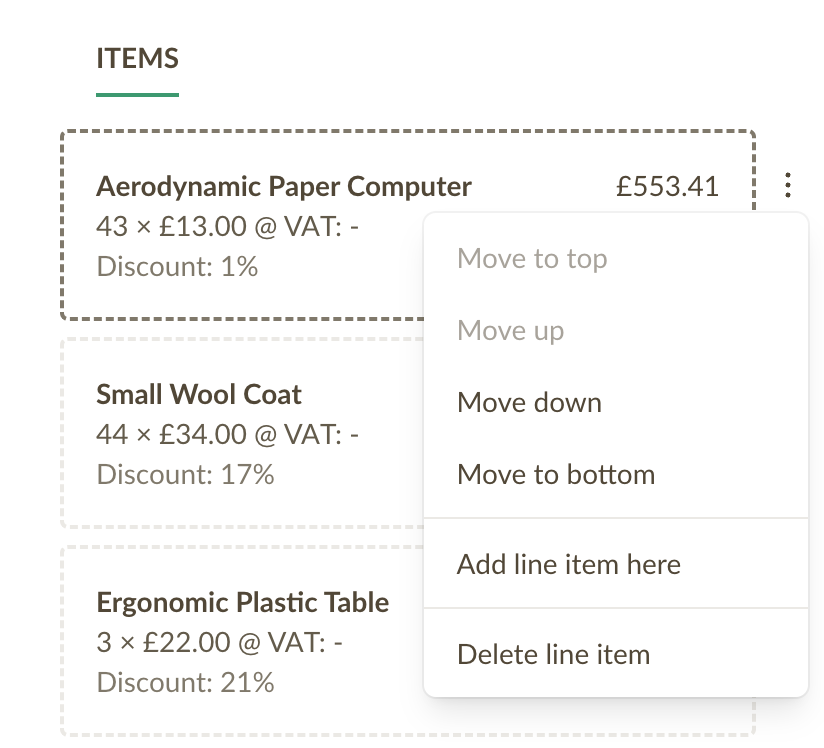
Reorder line items on mobile
We've also added a line item actions menu to the mobile version, making it easier to insert, reorder and delete line items on the go.
Introducing the Sales Representative role
A Sales Representative can only see their own invoices and estimates.
- Can create, edit and view their own invoices
- Can create, edit and view their own estimates
- Can create, edit and view all products
- Can create, edit and view all customers
- Cannot access company billing or settings
Email templates: send copies and attach PDFs
Today, we released an update which allows you to send a copy of each invoice to your own (or your accountant's) email - similar to like it was in the old version 🙂
Here's how it works:
- Go to company settings
- Click on Emails
- Click on the New email template button, or next to an existing template, click on the 3 dots to open the menu, and then "Edit"
- Enter up to 3 email addresses to the "Send a copy to" field
- Check or uncheck the "Attach PDF" option
- Save the template
Now, the next time you send and invoice using this template, the Bcc field will automatically be filled with this email address 🎉.
Note: each email template has its own settings for the BCC (copy) field. When using multiple different email templates for sending invoices, make sure to add the email address to each of them.
5 New languages in Sliptree
Sliptree has been fully translated into 5 more languages:
- French
- German
- Greek
- Italian
- Spanish
Selected summary period is now remembered on Dashboard
The selected date range on Dashboard for invoice summaries is now remembered. This means that when you return to the Dashboard, the date range you last selected will be pre-selected, making it easier to keep track of your business performance over time the way you like it.
View invoice totals by period
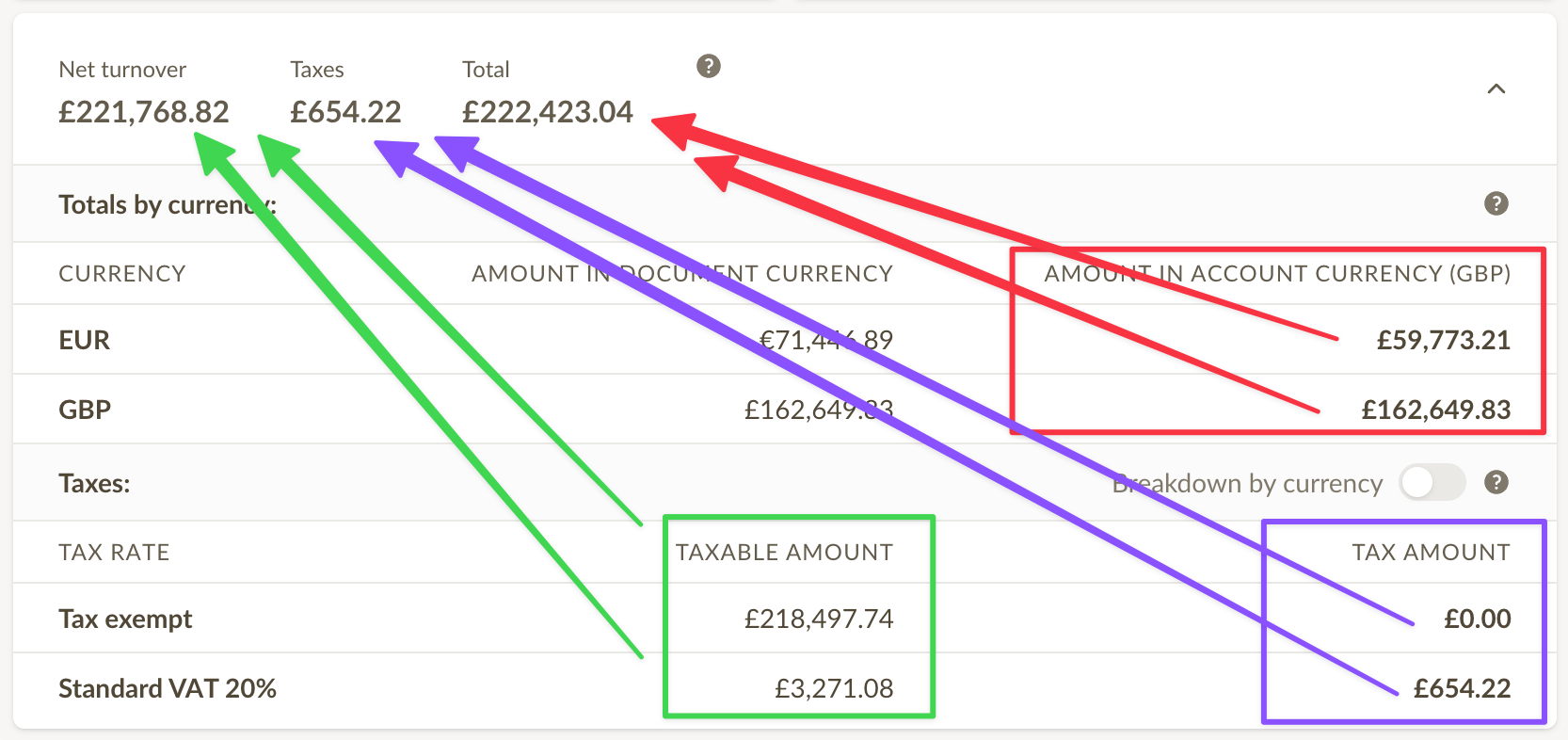
A summary of invoice totals for the currently selected period is now available in invoice lists. This summary only includes non-draft invoices, and is updated in real-time as you change the period or filter the list.
The summary makes it easier to see how much revenue you've generated in a given period, how much tax you've collected and which currencies you've been invoicing in, making it easier to file tax reports and keep track of your business performance.
Choose how prices are displayed on invoices
Following up on our update that allows you to adjust the line item amount on invoices, we've added a new feature that lets you choose how prices are displayed on invoices.
There are 3 display modes to choose from:
- Net - both the line item unit price and line total are displayed excluding tax.
- Gross - both the line item unit price and line total are displayed including tax.
- Split - line item unit price is displayed excluding tax and line total is displayed including tax.
While accountants usually choose either the net or gross display modes, the split mode will usually feel more natural to non-accountants, as the numbers add up when reading from left to right.
The price display can be adjusted from Business Settings > Settings, under Currency, prices & products - or, alternatively clicking on Invoice Settings when creating or editing an invoice.
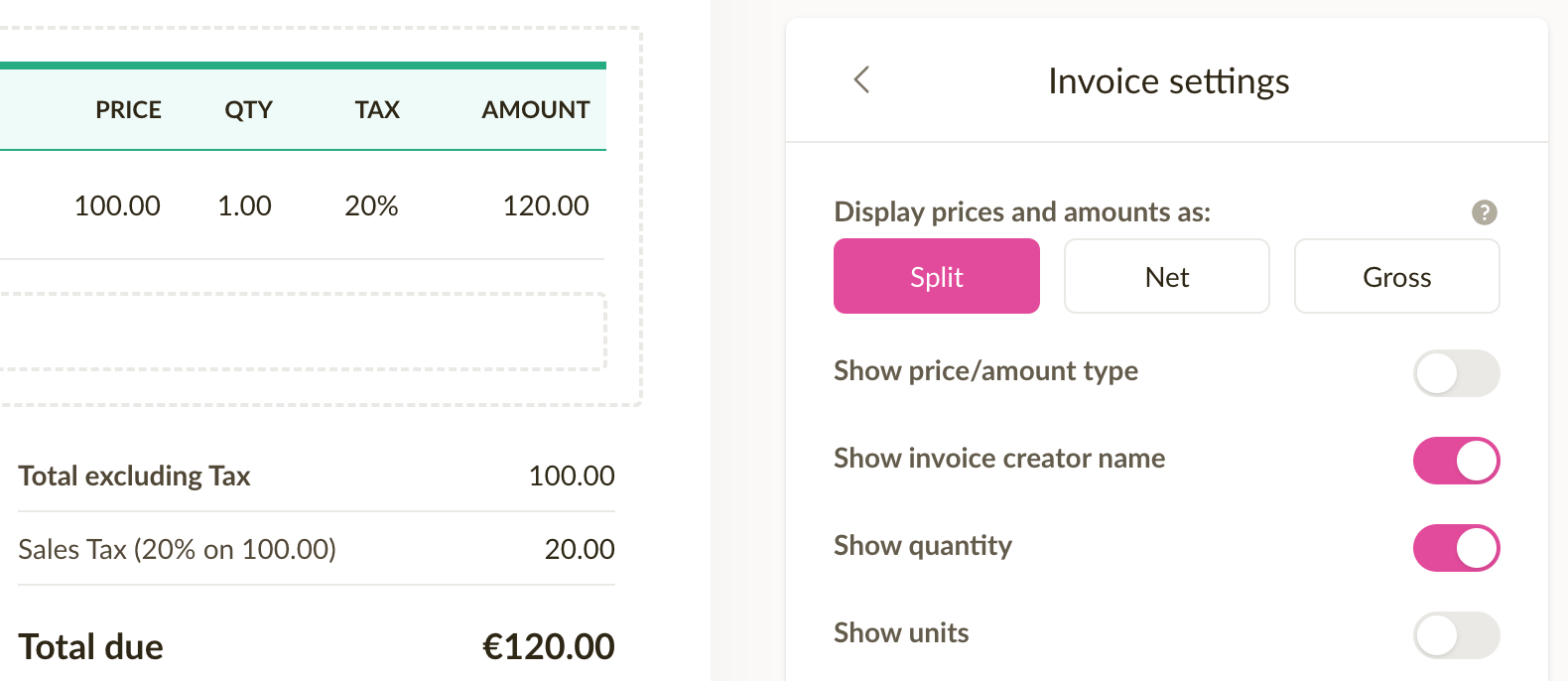
NB! This setting also affects price display on estimates.
Change invoice status quickly
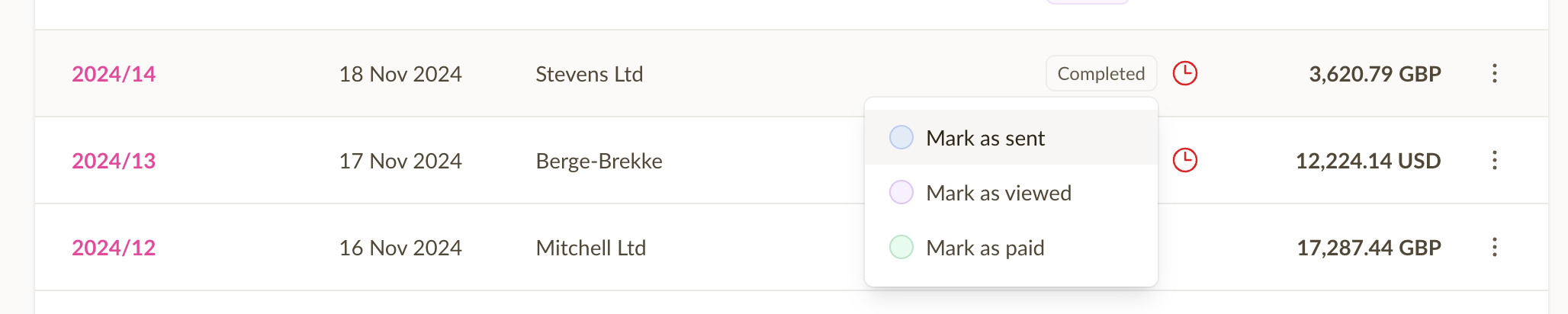
It's now possible to quickly change the status of an invoice or estimate by simply clicking on the status badge, and choosing a new status. This can be done both from the invoice list, and when viewing an individual invoice.
This speeds up the process of updating the status of an invoice or estimate, and makes it easier to keep track of the status of your invoices and estimates.
When marking an invoice as paid, Sliptree will create a payment behind the scenes, using the unpaid amount and payment method from the invoice as the payment details.
Adjust the line item amount on invoice
We've re-introduced the possibility to adjust line item amounts on invoices (and estimates). This feature was previously available in Sliptree, but did not initially make it to the new version. We've listened to your feedback and decided to bring it back.
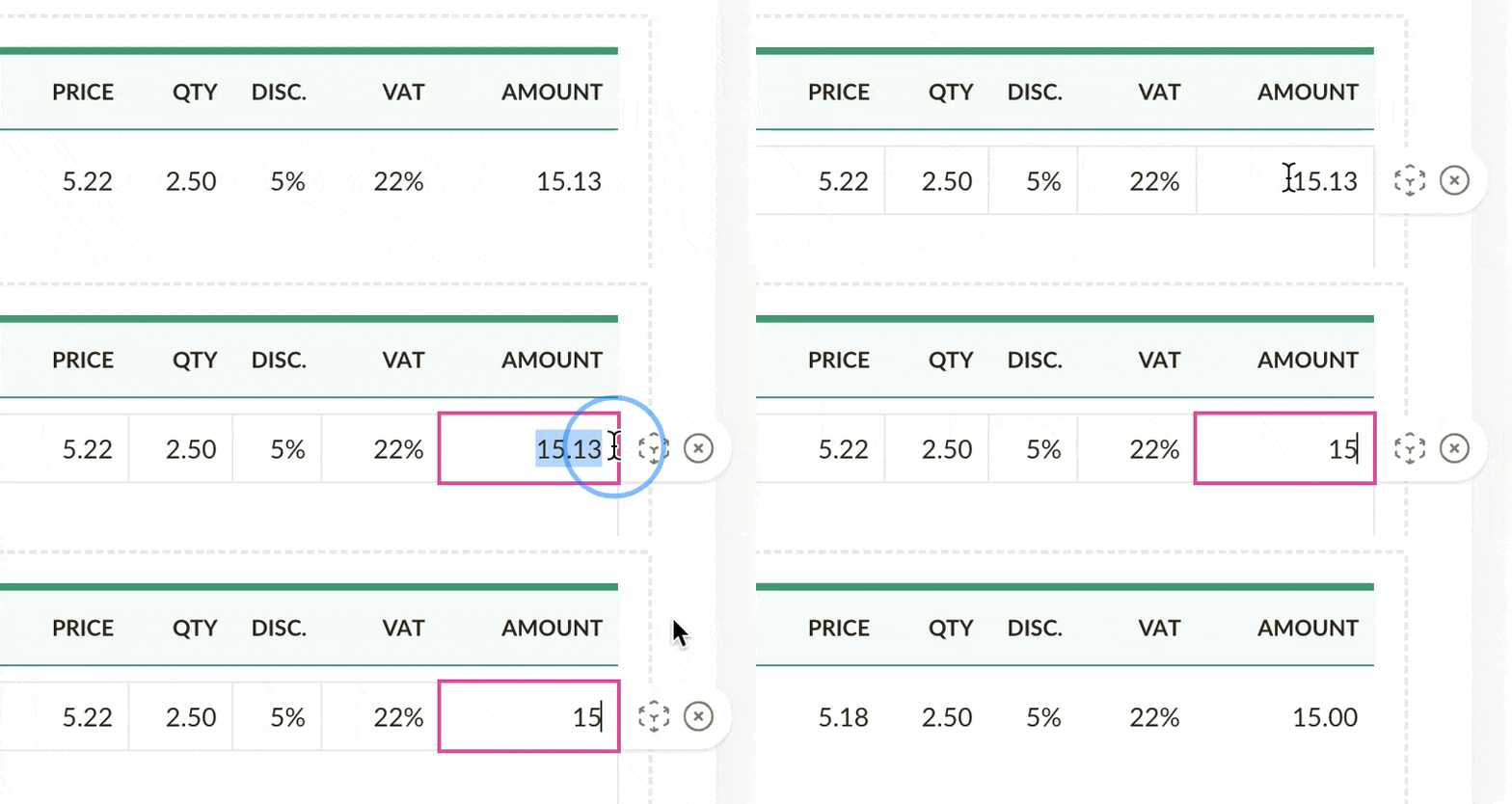
Here's how it works: sometimes, you might need to adjust the amount of a line item on an invoice. For example, let's say the line item adds up to something like $15.13, but you'd like to give a small discount and make it exactly $15.00. Instead of trying to tweak teh discount percentage or the net price, or the quantity, simply enter 15 to the line item amount field and Sliptree will adjust the net price automatically.