You can now see what each customer owes and how much of their money you are holding, and use that money to pay their next invoices in a few clicks. Prepayments, overpayments and what is left on a credit note no longer have to be tracked on the side. Read more about customer credit.
Where customer credit comes from
Customer credit is money that belongs to a customer but is not on any of their invoices yet. It appears when a customer pays more than the invoices you match the payment to, or when you record a bank payment as a prepayment with Prepayment or other income. A credit note that is larger than what is still open on its invoice leaves the rest as credit too, until you refund it or use it on another invoice.
When you take a payment off an invoice, the money stays as the customer's credit. For a payment you typed in by hand, Sliptree asks whether to keep it as credit or delete it. If you pay credit back, match the outgoing bank payment as a refund to that customer. The refund then takes the amount off their credit, so the same money is not offered for an invoice again.
The balance card on the customer page
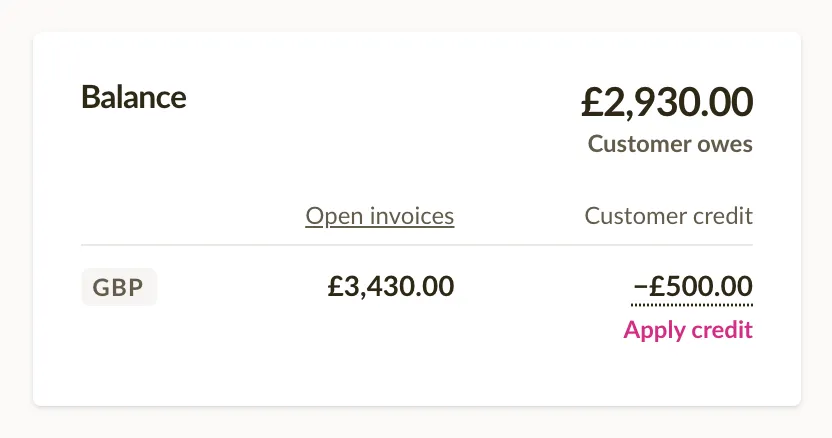
The customer page has a Balance card with two amounts for each currency: Open invoices, what is still unpaid, and Customer credit, shown with a minus. Click the credit amount to see how much of it is Left on credit notes and how much is Unused payments, with a link to each list.
At the top of the card the two are added up into one total, with Customer owes or Customer has credit under it. For example, €1,240.00 of open invoices and −€500.00 of credit give a total of €740.00 that the customer owes. When the amounts are in several currencies, the total is in your company currency at the latest exchange rate, marked with ≈.
Use credit to pay an invoice
On an unpaid invoice, the Add payment panel says above the form how much credit the customer has. Click Apply credit, tick the credit you want to use and lower the amount if you want to use only part of it. The invoice is then paid or partly paid, and what you did not use stays as credit for later. Open credit notes of the same customer are in the same list, so what is left on a credit note can pay another invoice too.
To use credit on several invoices at once, click Apply credit on the customer's Balance card. Sliptree ticks the oldest open invoices until the credit runs out, and you can change which invoices get it and how much before you save. The message after saving offers Undo in both places.
Customer balances in the customer list
The customer list has two new columns, Open invoices and Customer credit, and you can sort by either of them. The Balance filter finds the customers who have open invoices or credit. Balance amount narrows them down by size, for example to the customers with more than €500 of open invoices.
The balance in invoice emails
Invoice emails have two new placeholders, Customer balance and Customer overdue balance. Type : in an email template or in the message and pick one. The email then shows what the customer owes in total, or only the overdue part, after their credit is taken off. That is useful in a reminder, where the customer sees the whole amount and not just one invoice.