You can now round the total of an invoice, an estimate or a recurring invoice, and the difference shows on the document as a line of its own. It helps most when your customers pay in cash, because several countries require cash payments to be rounded to 5 cents.
Rounding is set on each document, on the invoice page
While you work on an invoice, click the totals below the line items. That opens Invoice details straight on Round the total to:, which offers Nearest 0.05, Nearest 0.10, Nearest 1.00 and Custom amount. The same panel opens when you click the invoice number and dates at the top of the document. The total changes as soon as you choose, and a Rounding line with the difference appears above the amount to pay. A total of 10.03, for example, becomes 10.05 when rounded to the nearest 0.05, with 0.02 on the rounding line.
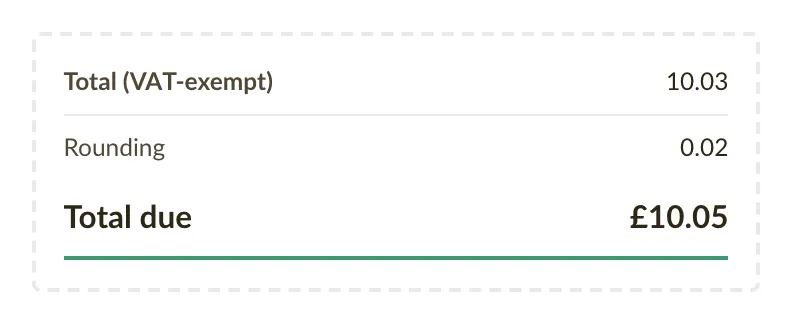
With Custom amount you type the difference yourself, up to 5.00 in either direction. You need it when you have agreed on a round 100.00 with a customer, for example, and the VAT calculation lands on 100.01.
A default for new invoices and estimates
If you round every invoice the same way, you can set it once. Open Business settings and choose a value for Round invoice totals to in the section Invoice late fees, payment terms & notes. Estimates have their own setting, Round estimate totals to, in the section Estimate expiration & notes. New documents start with that choice, and you can still change it on each one.
Cash payments in countries that round to 5 cents
Belgium, Estonia, Finland, Ireland, Italy, Lithuania, the Netherlands and Slovakia require cash payments to be rounded to the nearest 5 cents. If your business is in one of them, Nearest 0.05 is marked as suggested on invoices in euros. The Payment method is on the same panel, and when you choose Cash there, that rounding turns on for the invoice, unless you have already picked another one.
Bank transfers are always paid to the exact amount, so nothing is rounded until you choose it.
The rounding follows the document
The rounding line prints on the PDF and is carried on e-invoices too, so your customer's accounting software reads the same rounded amount. An estimate keeps its rounding when you turn it into an invoice, and a recurring invoice passes its rounding on to every invoice it generates. On a credit note the rounding has the opposite sign, so the invoice and its credit note still cancel out.
Fixes and improvements
- When you mark an invoice as paid from its status (click the status, then Mark as paid), the payment takes the payment method saved on the invoice. If the invoice has none, it takes the method set in your settings (Default payment method under Business settings). If that is empty too, the payment is recorded as Bank transfer.
- A recurring invoice can now have a Payment method, which prints on every invoice it generates. You find it on the Invoice details tab of Details & schedule.
- A new recurring invoice now starts with one empty line, the way a new invoice does. Before, you had to add the first line yourself.
- A cog now appears next to the header of the line item table when you hover over it. It opens Invoice settings, where you choose which columns show and how prices are displayed.
- In rare cases an e-invoice was rejected because the customer's registration number had been saved with a stray character, such as a comma. Such characters are now removed when you save, and e-invoices to those customers should go through.
- The help link under the invoice, estimate, customer and product lists now opens the article inside the app, in your own language. Before, it opened the English help site in a new tab.